
In today’s digital age, online security is more critical than ever.
With the increasing prevalence of cyber threats, safeguarding your online accounts is paramount.
One of the most effective ways to enhance your digital security is by implementing Two-Factor Authentication (2FA). In this article, we’ll explore why you should be using 2FA and provide a step-by-step guide on how to set it up.
What is Two-Factor Authentication?
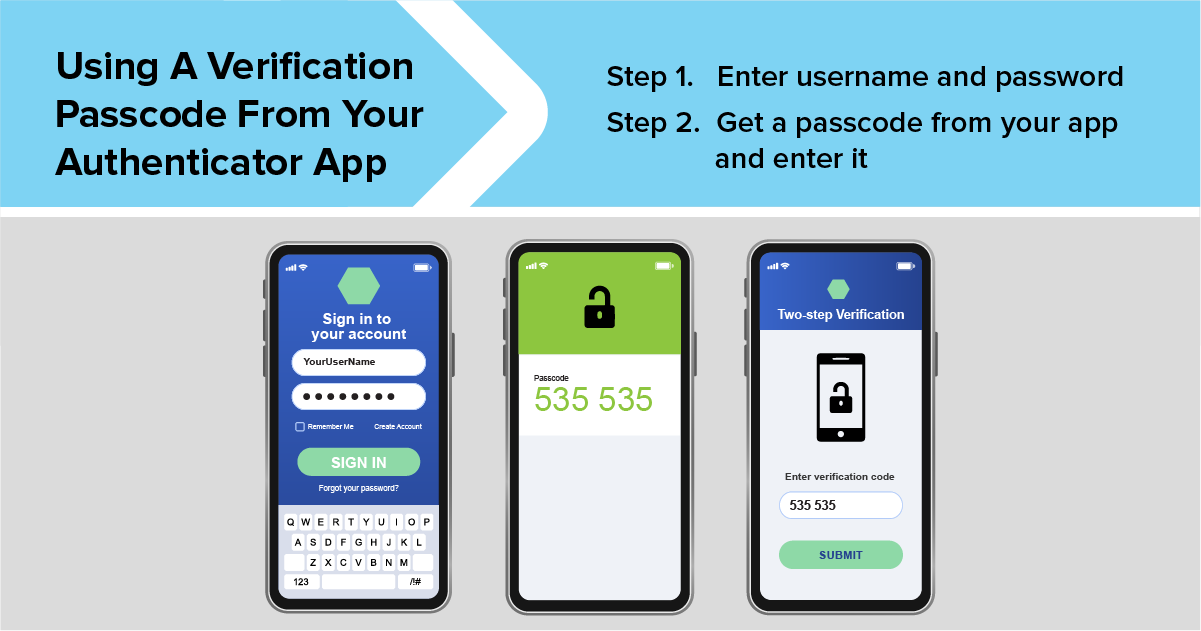
Two-Factor Authentication (2FA) is a security process in which users provide two different authentication factors to verify their identity. This method adds an extra layer of protection beyond just a username and password. The two factors typically include something you know (your password) and something you have (a secondary device or token).
Why You Should Be Using Two-Factor Authentication
Enhanced Security
Passwords alone are no longer sufficient to protect your accounts. Cybercriminals have various techniques, such as phishing, keylogging, and brute force attacks, to crack passwords. 2FA mitigates these risks by requiring an additional verification step, making it significantly harder for unauthorized users to gain access.
Protection Against Phishing
Even if a cybercriminal manages to obtain your password through phishing, they would still need the second factor of authentication to access your account. This extra layer of security can prevent unauthorized access even if your password is compromised.
Peace of Mind
Knowing that your accounts are secured with 2FA provides peace of mind. You can rest easy knowing that even if someone tries to hack your account, they would face an additional barrier that is not easily bypassed.
Compliance with Regulations
Many industries now require 2FA for compliance with security standards and regulations. Implementing 2FA ensures that you meet these requirements and avoid potential fines or penalties.
How to Set Up Two-Factor Authentication
Setting up 2FA is a straightforward process. Here’s a step-by-step guide:
Step 1: Choose Your 2FA Method
There are several methods of 2FA, including:
SMS-based 2FA: A code is sent to your mobile phone via text message.
App-based 2FA: Use an authentication app like Google Authenticator or Authy, which generates a time-based code.
Hardware tokens: Physical devices like YubiKey that you plug into your computer or use wirelessly.
Biometric verification: Uses your fingerprint or facial recognition as the second factor.
Step 2: Enable 2FA on Your Account
Most online services and platforms support 2FA. Here’s a general process to enable it:
Log in to your account: Access the security settings of the service where you want to enable 2FA.
Find the 2FA option: This is usually found under “Security” or “Account Settings.”
Select your preferred 2FA method: Choose from SMS, app-based, hardware token, or biometric.
Follow the setup instructions: The service will guide you through the process of linking your second factor.
Step 3: Verify and Test
After setting up 2FA, it’s crucial to verify that it works correctly:
Log out and log back in: Ensure that you receive the 2FA prompt and can successfully authenticate using your chosen method.
Backup codes: Many services provide backup codes in case you lose access to your 2FA method. Store these codes in a safe place.
Conclusion
Incorporating Two-Factor Authentication into your security practices is a simple yet highly effective way to protect your online accounts. By requiring a second form of verification, you add a robust layer of defense against unauthorized access and cyber threats. Don’t wait for a security breach to take action—enable 2FA today and secure your digital life.
Get Started with 2FA
Ready to boost your security? Begin by enabling 2FA on your most critical accounts, such as email, banking, and social media. It’s a small step that can make a significant difference in protecting your personal information.